
Step 2 – Client Demographics
Step 2 collects basic information about the client. This information is used to filter the service listings shown in Step 4. The more accurately it is completed, the better the match.
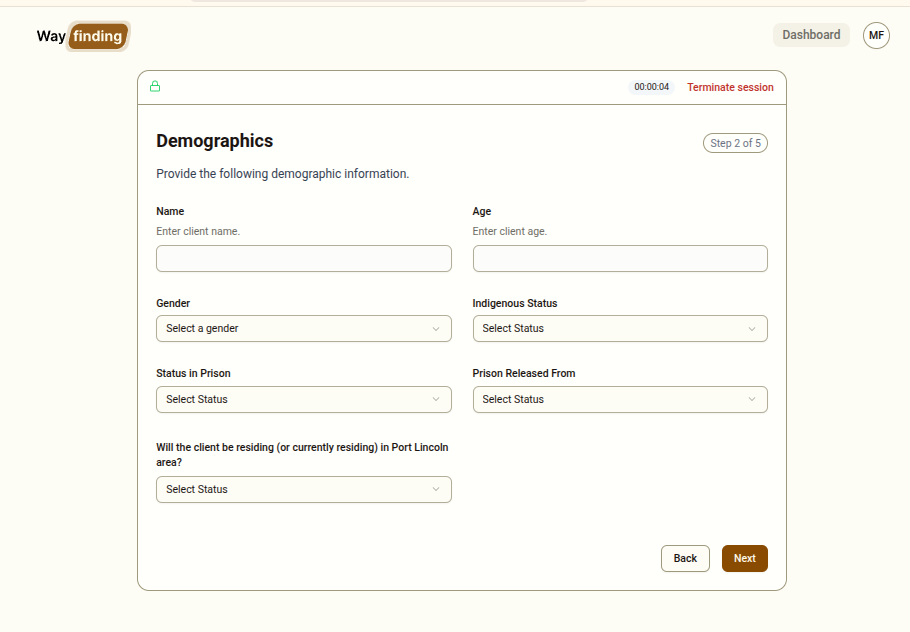
Fields
Section titled “Fields”Client Name
Section titled “Client Name”Enter the client’s first and last name.
Enter the client’s age as a number.
Gender
Section titled “Gender”Select from:
- Male
- Female
- Other
Indigenous Status
Section titled “Indigenous Status”Select from:
- Aboriginal and/or Torres Strait Islander
- Non-Indigenous
- Prefer not to say
Status in Prison
Section titled “Status in Prison”Select from:
- Remanded — held in custody awaiting trial or sentencing
- Sentenced — currently serving a sentence
- Don’t know
Prison Released From
Section titled “Prison Released From”Select from:
- Port Lincoln Prison
- Other
- Don’t know
Port Lincoln Residence
Section titled “Port Lincoln Residence”Whether the client intends to reside in Port Lincoln after release:
- Yes
- No
- Don’t know
Guidance on “Don’t Know” Options
Section titled “Guidance on “Don’t Know” Options”Some fields include a Don’t know, Other or Prefer not to say options. Use these options if a client is unsure or does not wish to answer a specific question. Selecting “Don’t know” for multiple fields will result in a broader (less filtered) list of services being shown in Step 4. For example, if a person answers Other for the Gender question, that client will be presented with services provided to all genders.
Validation
Section titled “Validation”All fields are required. The Next button will not activate until all fields have a value selected or entered. If you try to proceed with empty fields, error messages will appear below each incomplete field.