
Step 1 – Privacy & Consent
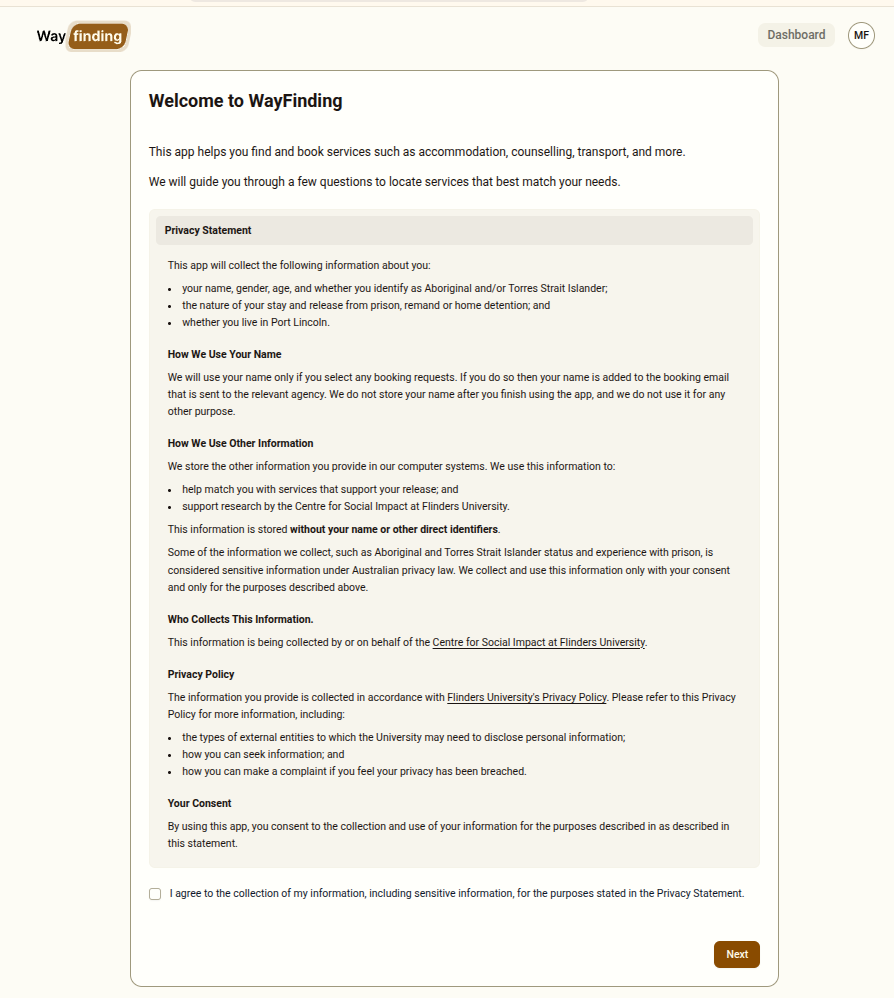
The first screen presents a privacy statement that must be read with the client before any personal information is collected.
What the Privacy Statement Covers
Section titled “What the Privacy Statement Covers”The statement explains:
- What is collected — name (if a booking is made), gender, age, Indigenous status, prison status, and Port Lincoln residence
- Why it is collected — to match the client with relevant services and for research purposes conducted by the Centre for Social Impact at Flinders University
- How names are handled — names are only recorded if a booking is made, and are deleted from the system at the end of the session
- Data storage — data is stored without direct identifiers
- Privacy policy — a link to the full privacy policy is provided
How to Handle This Step
Section titled “How to Handle This Step”Read through the privacy statement with the client. Give them the opportunity to ask questions before proceeding.
Once the client understands and agrees, they (or you, with their verbal agreement) must tick the consent checkbox at the bottom of the statement. The Next button will not become active until the checkbox is ticked.
If a Client Declines
Section titled “If a Client Declines”If a client does not wish to consent, do not proceed. Use the Terminate session button in the top bar to end the session. The system will record it as cancelled — no personal data from the client will be retained.